Expression Language
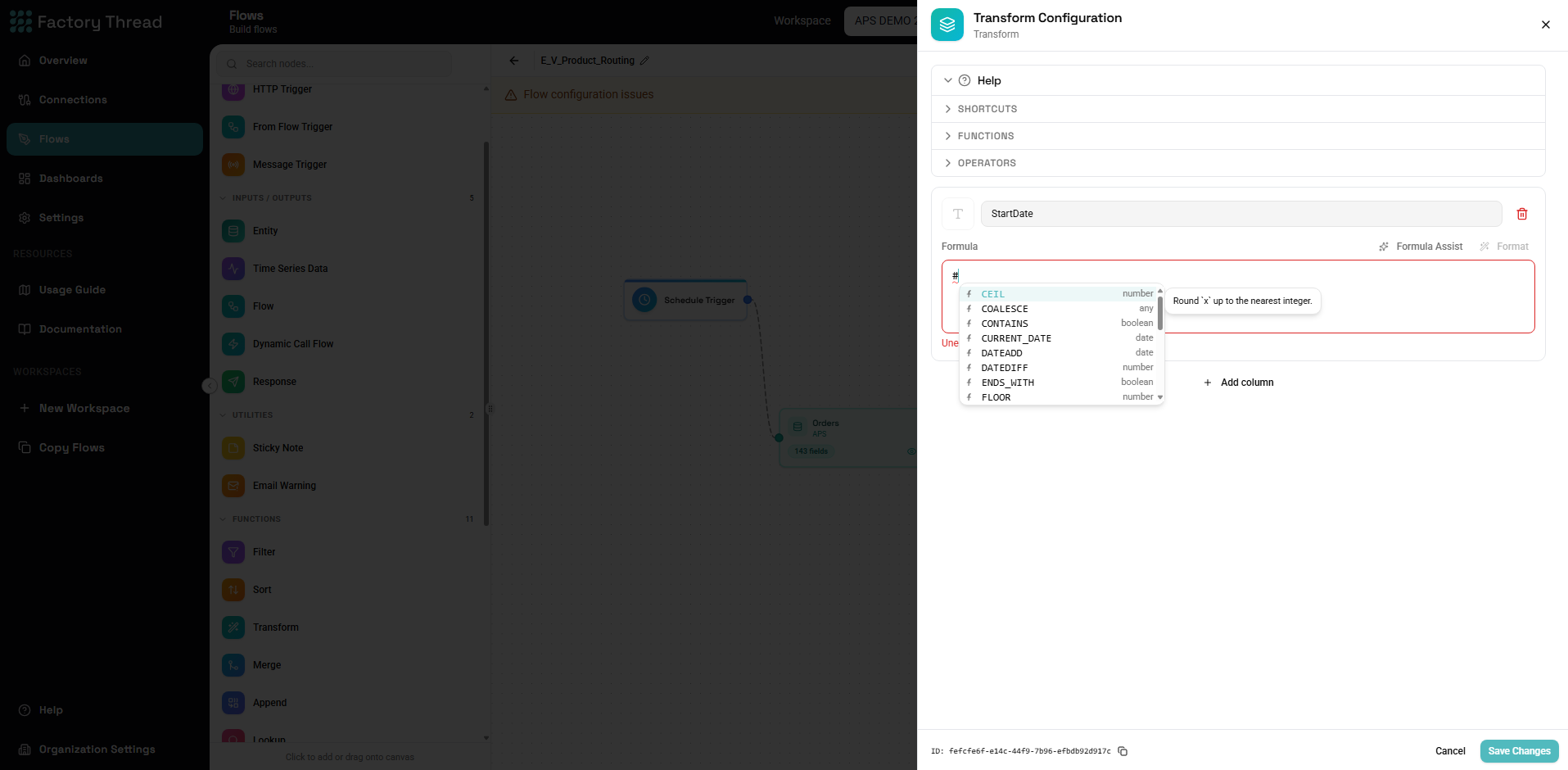
Several Function nodes evaluate small expressions to compute values: the Formula node, the Filter condition, the aggregates in Group By, and the field bindings in Map. They all share one expression language — sometimes called the fx language — so once you learn it in one place it works everywhere.
The language is strict-SQL style, not JavaScript. If you have written
spreadsheet formulas or SQL WHERE/SELECT expressions, it will feel
familiar: = compares, & joins text, AND/OR/NOT combine conditions,
and NULL flows through arithmetic.
Referencing fields
Reference a field from the incoming data by its name:
Quantity
UnitPrice
If a field name contains spaces, punctuation, or matches a reserved word
(AND, OR, NOT, NULL, TRUE, FALSE, IS), wrap it in square
brackets:
[Order Total]
[Unit Price (USD)]
[Null]
Literals
| Kind | Examples |
|---|---|
| Text | "Active", "Seattle, WA" |
| Number | 100, 3.14159, -50 |
| Boolean | TRUE, FALSE |
| Null | NULL |
Text literals use double quotes.
Operators
Arithmetic
| Operator | Meaning | Example |
|---|---|---|
+ | Add | Price + Tax |
- | Subtract | Revenue - Cost |
* | Multiply | Quantity * UnitPrice |
/ | Divide | Total / Count |
% | Modulo (remainder) | RowNumber % 2 |
Text
| Operator | Meaning | Example |
|---|---|---|
& | Concatenate | FirstName & " " & LastName |
& joins values of any type — numbers, booleans, dates, and objects are
converted to text automatically. If any operand is NULL, the result is
NULL.
Coming from another tool? Use
&to join text, not+. Using+between text values is an error.
Comparison
| Operator | Meaning | Example |
|---|---|---|
= | Equal to | Status = "Active" |
!= | Not equal to | Type != "Test" |
> | Greater than | Amount > 100 |
>= | Greater than or equal | Score >= 80 |
< | Less than | Age < 18 |
<= | Less than or equal | Count <= 10 |
Equality is a single
=, not==.
Logical
| Operator | Meaning | Example |
|---|---|---|
AND | Both sides true | Active AND Verified |
OR | Either side true | Admin OR Manager |
NOT | Negate | NOT Deleted |
Null checks
| Operator | Meaning | Example |
|---|---|---|
IS NULL | Operand is null | CompletedDate IS NULL |
IS NOT NULL | Operand is not null | CompletedDate IS NOT NULL |
Use these to test for null — = NULL does not work in SQL-style
semantics.
How NULL behaves
The language follows SQL's null rules, which differ from most programming languages:
- Null propagates through arithmetic and text.
Price * QuantityisNULLif either operand isNULL;FirstName & LastNameisNULLif either name isNULL. - Most functions return
NULLwhen a required argument isNULL—UPPER(NULL)isNULL. - Use
IS NULL/IS NOT NULLto test, andCOALESCEorIFNULLto substitute a default.
COALESCE(PreferredName, FirstName, "Unknown")
Types are strict
Arguments are checked against their expected type — there is no implicit
coercion. ROUND("2.5", 1) is an error because ROUND expects a number.
Convert explicitly first:
ROUND(TO_NUMBER(PriceText), 2)
Functions
Function names are case-insensitive. The built-in functions are:
Conditional
IF(cond, then, else)
Returns then when cond is TRUE, otherwise else. Short-circuits — only
the chosen branch is evaluated, so IF(x != 0, y / x, 0) is safe when x is
zero. A NULL condition is treated as false.
IF(100 > 50, "big", "small")
IF(Amount > 1000, "High", "Standard")
To handle several cases, nest IF:
IF(Score >= 90, "A",
  IF(Score >= 80, "B",
    IF(Score >= 70, "C", "F")))
COALESCE(value1, value2, ...)
Returns the first argument that is not NULL. Stops evaluating once a
non-null value is found.
COALESCE(MobilePhone, WorkPhone, HomePhone)
IFNULL(value, fallback)
Returns value if it is not NULL, otherwise fallback.
IFNULL(Notes, "")
Text
| Function | Returns | Description | Example |
|---|---|---|---|
UPPER(text) | text | Uppercase | UPPER("hello") → "HELLO" |
LOWER(text) | text | Lowercase | LOWER("HELLO") → "hello" |
TRIM(text) | text | Remove leading/trailing whitespace | TRIM(" hi ") → "hi" |
SPLIT(text, delim, index) | text | Split text by delim, return the 0-based segment at index (NULL if out of range) | SPLIT("a,b,c", ",", 1) → "b" |
CONTAINS(text, sub) | boolean | True if text contains sub | CONTAINS("hello world", "world") → TRUE |
STARTS_WITH(text, prefix) | boolean | True if text starts with prefix | STARTS_WITH("factorythread", "factory") → TRUE |
ENDS_WITH(text, suffix) | boolean | True if text ends with suffix | ENDS_WITH("report.csv", ".csv") → TRUE |
Numeric
| Function | Returns | Description | Example |
|---|---|---|---|
ROUND(x, decimals?) | number | Round to decimals digits (default 0) | ROUND(2.345, 2) → 2.35 |
FLOOR(x) | number | Round down to the nearest integer | FLOOR(2.9) → 2 |
CEIL(x) | number | Round up to the nearest integer | CEIL(2.1) → 3 |
Date
| Function | Returns | Description | Example |
|---|---|---|---|
DATEADD(date, amount, unit) | date | Add amount of unit to a date | DATEADD(OrderDate, 7, "day") |
DATEDIFF(start, end, unit) | number | Whole units from start to end — end minus start | DATEDIFF(OrderDate, CURRENT_DATE(), "day") |
FORMAT_DATE(date, format) | text | Format a date with a dayjs format string | FORMAT_DATE(OrderDate, "YYYY-MM-DD") |
unit is one of day, month, year, hour, minute, second.
DATEDIFF takes the earlier date first. It subtracts start from end, so
a later end gives a positive result — DATEDIFF(OrderDate, CURRENT_DATE(), "day")
is how many days old an order is. Swapping the two returns the same number
negated, and nothing warns you, so check the order when a difference comes out
negative unexpectedly.
DATEDIFF returns a whole number, rounded to the nearest unit. Rounding
rather than truncating matters when two source columns were captured from
separate clock reads and land a few milliseconds apart: a setup window of
1,799.971 seconds is a 30-minute window, and DATEDIFF(..., "seconds") reports
1800, not 1799. Negative intervals round away from zero, so
DATEDIFF(a, b, unit) is always exactly -DATEDIFF(b, a, unit).
There is no
NOW()orTODAY()function — useCURRENT_DATE()for the current date and time.
Type conversion
| Function | Returns | Description | Example |
|---|---|---|---|
TO_NUMBER(value, fallback?) | number | Parse a number; returns fallback (or NULL) on failure | TO_NUMBER("42") → 42 |
TO_STRING(value) | text | Convert to text (dates use ISO format, objects/arrays use JSON) | TO_STRING(42) → "42" |
TO_DATE(value, format?) | date | Parse a value as a date (optional dayjs format hint) | TO_DATE("2025-03-15") |
TO_BOOLEAN(value) | boolean | Convert to boolean — accepts true/false, 1/0, "true"/"false"/"1"/"0" | TO_BOOLEAN("true") → TRUE |
System
| Function | Returns | Description |
|---|---|---|
CURRENT_DATE() | date | The current date and time |
UUID() | text | A new unique identifier (UUID) |
Errors and strict mode
By default, if an expression fails on a particular row (for example a type error or a division that produces an invalid value), that row's result for the affected field is left empty and the flow continues. Nodes that evaluate expressions — Formula and Filter — expose a strict mode toggle; when enabled, the first row error stops the run instead, which is useful while you are debugging a flow.