Group By Function
The Group By function aggregates your data by grouping rows with common values and calculating summary statistics. It's essential for creating reports, summaries, and analytics from detailed data.
How It Works
Group By processes your data by:
- Identifying rows with matching values in grouping fields
- Combining those rows into a single output row
- Calculating aggregate functions across grouped rows
- Outputting one row per unique group
Example:
Input: 10 orders across 3 customers
Output: 3 rows (one per customer) with order totals
Adding a Group By
- Drag Group By from the Functions section of the Element Panel
- Connect it to your data source
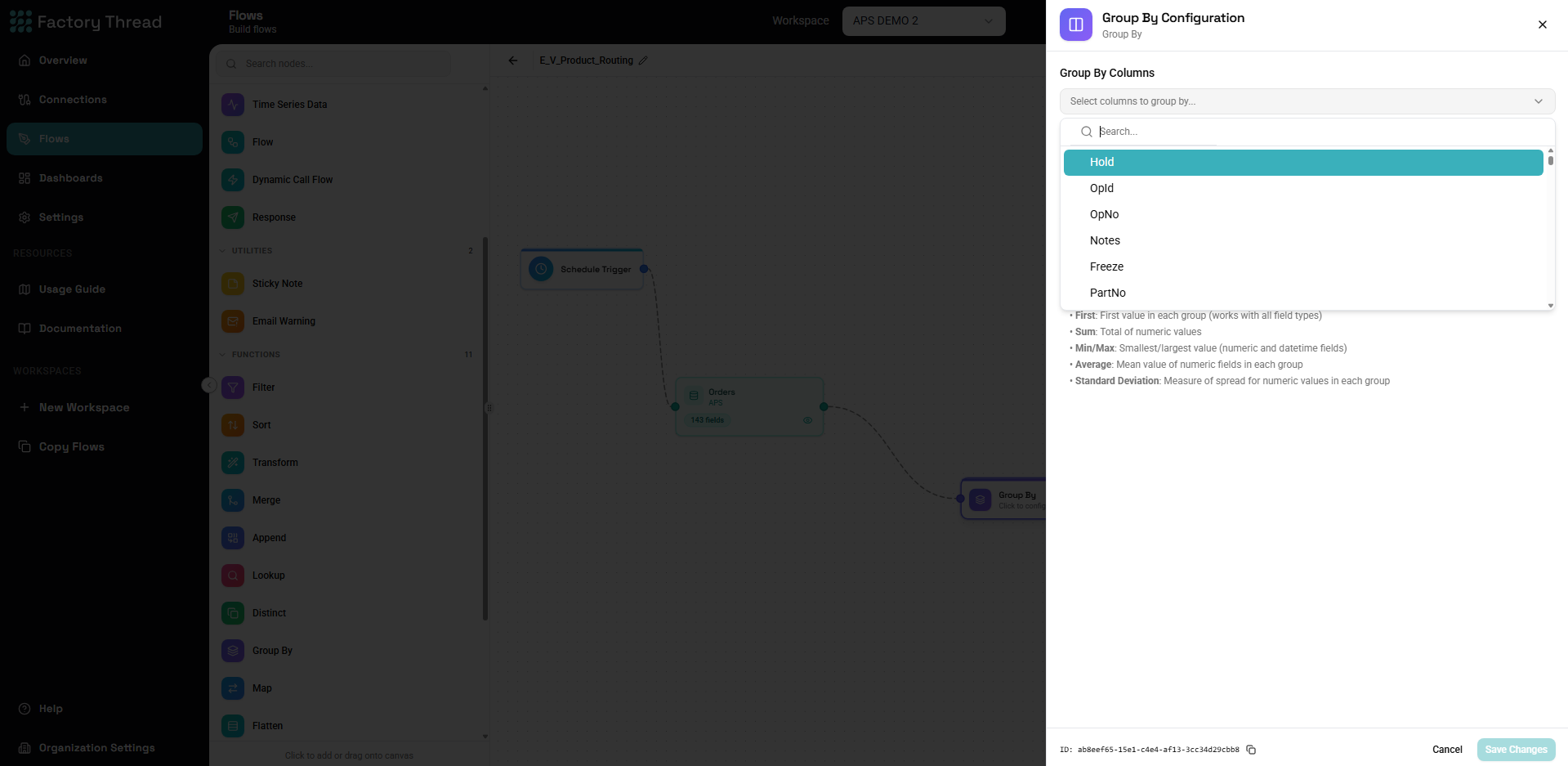
- Click the Group By node to configure grouping and aggregations
Configuration Panel
Grouping Fields
Specify which fields define the groups:
Single field grouping:
- Group by: Region
- Output: One row per unique Region
Multiple field grouping:
- Group by: Region, Year
- Output: One row per unique Region-Year combination
Adding Grouping Fields
- Click Add Grouping Field
- Select a field from the dropdown
- Add additional fields as needed
The order of grouping fields affects output ordering but not the grouping logic.
Aggregate Functions
Define calculations to perform on grouped rows:
COUNT
Counts the number of rows in each group.
Configuration:
| Function | Field | Output Name |
|---|---|---|
| COUNT | * | OrderCount |
Variations:
COUNT(*)- Count all rowsCOUNT(field)- Count non-null values in field
SUM
Adds up numeric values across grouped rows.
Configuration:
| Function | Field | Output Name |
|---|---|---|
| SUM | Amount | TotalAmount |
Use for:
- Total sales
- Total quantity
- Sum of any numeric measure
AVG (Average)
Calculates the arithmetic mean of numeric values.
Configuration:
| Function | Field | Output Name |
|---|---|---|
| AVG | Price | AveragePrice |
Note: Null values are excluded from average calculation.
MIN
Returns the minimum value in the group.
Configuration:
| Function | Field | Output Name |
|---|---|---|
| MIN | OrderDate | FirstOrderDate |
Works with:
- Numbers (smallest value)
- Dates (earliest date)
- Text (alphabetically first)
MAX
Returns the maximum value in the group.
Configuration:
| Function | Field | Output Name |
|---|---|---|
| MAX | Price | HighestPrice |
Works with:
- Numbers (largest value)
- Dates (latest date)
- Text (alphabetically last)
FIRST
Returns the first value encountered in the group.
Configuration:
| Function | Field | Output Name |
|---|---|---|
| FIRST | Description | SampleDescription |
Use when:
- You need any representative value
- The field is same for all rows in group
- Order matters (with sorting)
LAST
Returns the last value encountered in the group.
Configuration:
| Function | Field | Output Name |
|---|---|---|
| LAST | Status | CurrentStatus |
Use when:
- You want the most recent value
- Data is pre-sorted chronologically
LIST
Collects all values into an array.
Configuration:
| Function | Field | Output Name |
|---|---|---|
| LIST | ProductName | ProductList |
Output: Array of all product names in the group
Use when:
- You need to preserve all values
- Creating comma-separated lists
- Nested data structures
DISTINCT_COUNT (Count Distinct)
Counts unique values in the group.
Configuration:
| Function | Field | Output Name |
|---|---|---|
| DISTINCT_COUNT | CustomerID | UniqueCustomers |
Use for:
- Counting unique customers
- Counting distinct products
- Any unique count scenario
Multiple Aggregations
Add multiple aggregations for comprehensive summaries:
Example configuration:
| Function | Field | Output Name |
|---|---|---|
| COUNT | * | OrderCount |
| SUM | Amount | TotalAmount |
| AVG | Amount | AverageAmount |
| MIN | OrderDate | FirstOrder |
| MAX | OrderDate | LastOrder |
| DISTINCT_COUNT | ProductID | UniqueProducts |
Common Use Cases
Sales Summary by Region
Input: Order details Grouping: Region
Aggregations:
| Function | Field | Output |
|---|---|---|
| COUNT | * | OrderCount |
| SUM | Revenue | TotalRevenue |
| AVG | Revenue | AverageOrderValue |
| DISTINCT_COUNT | CustomerID | UniqueCustomers |
Output:
| Region | OrderCount | TotalRevenue | AverageOrderValue | UniqueCustomers |
|---|---|---|---|---|
| East | 150 | 45000 | 300 | 85 |
| West | 120 | 52000 | 433 | 72 |
Monthly Trend Analysis
Input: Daily transactions Grouping: Year, Month
Aggregations:
| Function | Field | Output |
|---|---|---|
| SUM | Amount | MonthlyTotal |
| COUNT | * | TransactionCount |
| AVG | Amount | DailyAverage |
Output: Monthly summaries for trend analysis
Product Performance
Input: Sales line items Grouping: ProductID, ProductName
Aggregations:
| Function | Field | Output |
|---|---|---|
| SUM | Quantity | TotalUnitsSold |
| SUM | Revenue | TotalRevenue |
| COUNT | OrderID | OrdersContaining |
| AVG | UnitPrice | AverageSellingPrice |
Customer Lifetime Value
Input: All customer orders Grouping: CustomerID
Aggregations:
| Function | Field | Output |
|---|---|---|
| MIN | OrderDate | FirstPurchase |
| MAX | OrderDate | LastPurchase |
| COUNT | OrderID | TotalOrders |
| SUM | Amount | LifetimeValue |
| AVG | Amount | AverageOrderValue |
Inventory Status
Input: Stock movements Grouping: WarehouseID, ProductID
Aggregations:
| Function | Field | Output |
|---|---|---|
| SUM | QuantityIn | TotalReceived |
| SUM | QuantityOut | TotalShipped |
| LAST | RunningBalance | CurrentStock |
Grouping Strategies
Single Field Grouping
Simple category totals:
Group by: Category
Result: One row per category with totals
Multiple Field Grouping
Cross-tabulation:
Group by: Category, Region
Result: One row per category-region combination
Date-Based Grouping
To group by date parts, first transform dates:
Daily grouping:
Transform: DateOnly = FORMAT_DATE(${DateTime}, "YYYY-MM-DD")
Group by: DateOnly
Monthly grouping:
Transform: YearMonth = FORMAT_DATE(${Date}, "YYYY-MM")
Group by: YearMonth
Weekly grouping:
Transform: WeekStart = DATEADD(${Date}, -DATEPART(${Date}, "dayofweek"), "day")
Group by: WeekStart
Hierarchical Grouping
Create subtotals and grand totals:
Multi-level flow:
[Data] → [GroupBy: Region, Store] → [Subtotals by Store]
→ [GroupBy: Region] → [Subtotals by Region]
→ [GroupBy: (none)] → [Grand Total]
[Append all levels for rollup report]
Working with Aggregates
Filtering Grouped Data
Apply filters after Group By for aggregate-based filtering:
Example: High-value customers only
[Orders] → [GroupBy: CustomerID] → [Filter: TotalAmount > 10000]
This is equivalent to SQL's HAVING clause.
Calculating Percentages
After aggregation, calculate derived metrics:
Transform after Group By:
RevenueShare = ${GroupRevenue} / ${parameter:TotalRevenue} * 100
Ranking Groups
Add rankings after aggregation:
Transform:
// Would require sort + row number or use Lookup for ranks
Ratios and Rates
Calculate ratios from aggregates:
Transform after Group By:
ConversionRate = ${Conversions} / ${Visits} * 100
AverageOrderValue = ${TotalRevenue} / ${OrderCount}
RevenuePerCustomer = ${TotalRevenue} / ${UniqueCustomers}
NULL Handling
Grouping with NULLs
Null values in grouping fields:
- All nulls are grouped together
- Creates one group for "no value"
To separate null handling:
Transform before GroupBy:
GroupField = COALESCE(${Field}, "Unknown")
Aggregates with NULLs
| Function | NULL Behavior |
|---|---|
| COUNT(*) | Counts all rows including nulls |
| COUNT(field) | Excludes null values |
| SUM | Ignores nulls (0 if all null) |
| AVG | Ignores nulls in calculation |
| MIN/MAX | Ignores nulls |
| FIRST/LAST | May return null if encountered |
Handling Empty Groups
If a group has no data (after filtering):
- It won't appear in output
- To show zeros, use Lookup from master list
Performance Considerations
Filter Before Grouping
Reduce data volume before aggregation:
Less efficient:
[All Orders] → [GroupBy: Region] → [Filter: Year = 2024]
More efficient:
[Orders WHERE Year = 2024] → [GroupBy: Region]
Limit Grouping Fields
More grouping fields = more groups = more output rows:
- Group by what's needed only
- Consider hierarchical grouping for drill-down
Selective Aggregations
Calculate only needed aggregations:
- Each aggregation has computational cost
- Remove unused aggregations
Large Dataset Considerations
For very large datasets:
- Filter aggressively before grouping
- Consider pre-aggregated sources
- Use incremental processing
Troubleshooting
Wrong Aggregation Results
Count too high:
- Duplicates in source data
- Use DISTINCT_COUNT for unique counts
- Deduplicate before grouping
Sum seems wrong:
- Check for null values
- Verify the aggregated field
- Preview source data
Average unexpected:
- Nulls excluded from average
- Check for outliers
- Verify data types (text vs number)
Too Many Groups
Expected: 100 regions Got: 10,000 rows
Causes:
- Data quality issues (variations in values)
- Wrong grouping field
- Unexpected granularity
Solutions:
- Standardize values before grouping
- Check for leading/trailing spaces
- Verify correct field selected
Missing Groups
Expected groups not appearing:
- No data for that group (correct behavior)
- Upstream filtering removed data
- Null values grouped separately
To show all groups:
- Create master list of expected groups
- Left Join master with aggregated data
- COALESCE nulls to zeros
Memory Issues
Symptoms: Slow or failing on large data
Solutions:
- Filter source data first
- Reduce number of aggregations
- Consider sampling for analysis
- Process in chunks
Examples
Sales Dashboard Metrics
Goal: Key metrics for sales dashboard
Grouping: (None - grand totals)
Aggregations:
TotalRevenue = SUM(Amount)
TotalOrders = COUNT(*)
UniqueCustomers = DISTINCT_COUNT(CustomerID)
AverageOrderValue = AVG(Amount)
LargestOrder = MAX(Amount)
Department Budget Summary
Goal: Budget utilization by department
Grouping: Department
Aggregations:
TotalBudget = SUM(BudgetAmount)
TotalSpent = SUM(ActualAmount)
TransactionCount = COUNT(*)
Transform after:
Remaining = ${TotalBudget} - ${TotalSpent}
UtilizationPct = ${TotalSpent} / ${TotalBudget} * 100
Time-Based Analysis
Goal: Hourly traffic patterns
Preparation Transform:
HourOfDay = DATEPART(${Timestamp}, "hour")
Grouping: HourOfDay
Aggregations:
Visits = COUNT(*)
UniqueVisitors = DISTINCT_COUNT(SessionID)
PageViews = SUM(PageCount)
Customer Segmentation
Goal: Segment customers by behavior
Grouping: CustomerID
Aggregations:
OrderCount = COUNT(*)
TotalSpent = SUM(Amount)
FirstOrder = MIN(OrderDate)
LastOrder = MAX(OrderDate)
Transform after:
Segment = CASE(
${TotalSpent} >= 10000 && ${OrderCount} >= 10, "VIP",
${TotalSpent} >= 5000, "Premium",
${TotalSpent} >= 1000, "Regular",
"New"
)
Product Mix Analysis
Goal: Analyze product category performance
Grouping: Category, SubCategory
Aggregations:
SKUCount = DISTINCT_COUNT(ProductID)
UnitsSold = SUM(Quantity)
Revenue = SUM(LineTotal)
OrdersContaining = DISTINCT_COUNT(OrderID)
Sort: Revenue DESC
Next Steps
- Filter Function - Filter aggregated results
- Transform Function - Calculate derived metrics
- Distinct Function - Remove duplicates before grouping
- Building Flows - Complete workflow guide