Merge Function
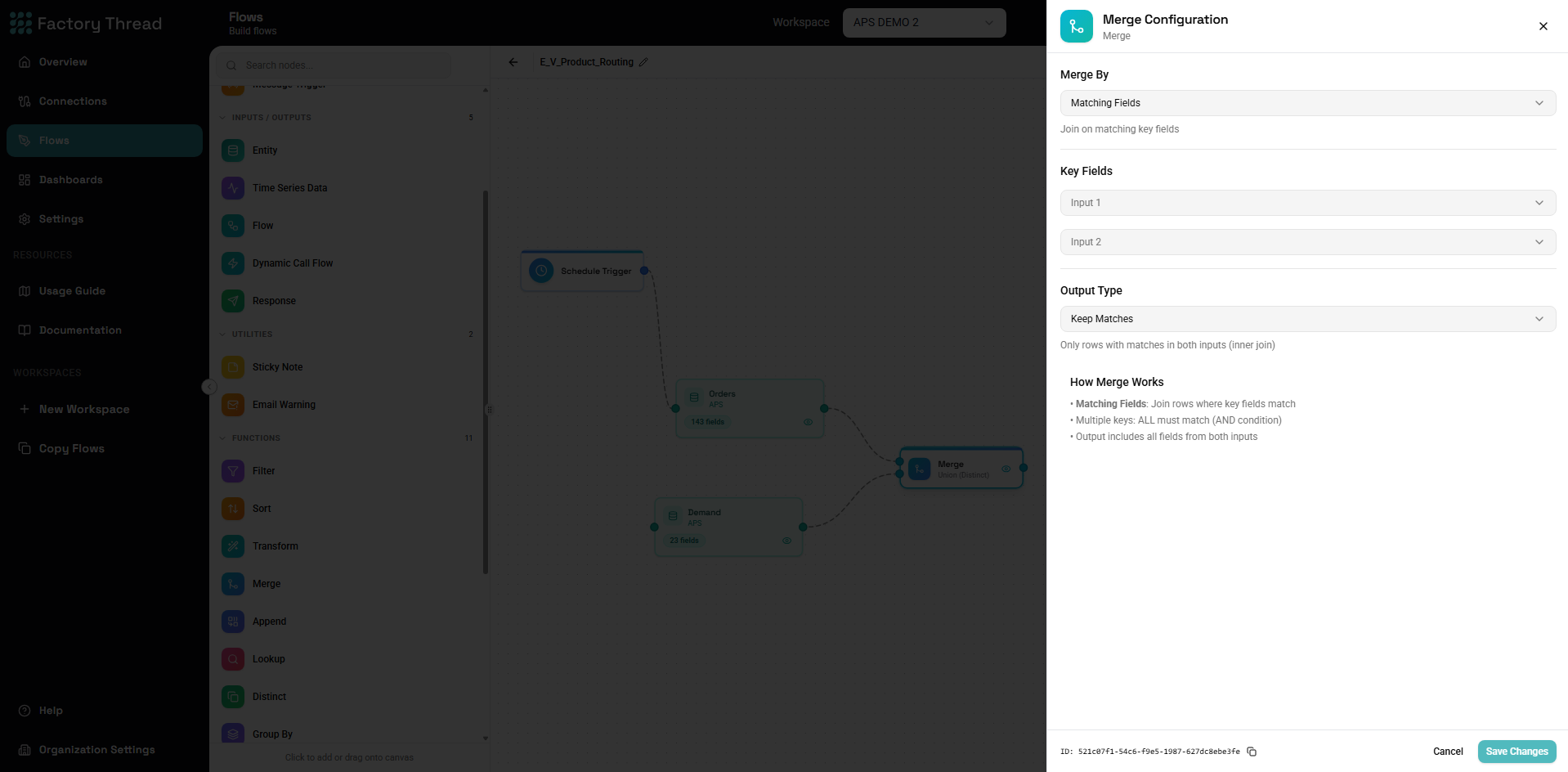
The Merge function combines data from two sources based on matching keys, similar to a SQL JOIN. It's essential for bringing together related data from different entities or creating unified datasets.
How It Works
Merge connects two data sources and:
- Matches rows based on specified key fields
- Combines matched rows into a single output row
- Handles unmatched rows based on the join type
- Includes fields from both sources in the output
The join logic determines which rows appear in the output.
Adding a Merge
- Drag Merge from the Functions section of the Element Panel
- Connect two upstream sources to the Merge node
- Click the Merge node to configure join settings
Important: Merge requires exactly two inputs:
- Left source (primary data)
- Right source (data to join)
Configuration Panel
Join Type
Select how to handle matching and non-matching rows:
Inner Join
Only rows with matches in both sources appear in output.
Visual:
Left:  1, 2, 3, 4
Right:    2, 3,    5, 6

Output:   2, 3
Use when:
- You only want records that exist in both datasets
- Filtering to common records is the goal
- Missing data should exclude the row
Left Join
All rows from left source appear. Right source data is included when matched.
Visual:
Left:  1, 2, 3, 4
Right:    2, 3,    5, 6

Output:1, 2, 3, 4  (with right data for 2, 3; null for 1, 4)
Use when:
- Left source is your primary data
- You want all primary records regardless of matches
- Missing related data should be null
Right Join
All rows from right source appear. Left source data is included when matched.
Visual:
Left:  1, 2, 3, 4
Right:    2, 3,    5, 6

Output:   2, 3,    5, 6  (with left data for 2, 3; null for 5, 6)
Use when:
- Right source is your primary data
- You want all secondary records regardless of matches
- Similar to left join with sources swapped
Full Outer Join
All rows from both sources appear. Fields are null where there's no match.
Visual:
Left:  1, 2, 3, 4
Right:    2, 3,    5, 6

Output:1, 2, 3, 4, 5, 6  (nulls for unmatched fields)
Use when:
- You need a complete picture from both sources
- Analyzing which records exist in one source but not the other
- Creating a master list from two partial lists
Join Keys
Specify which fields to match between sources.
Single Key
Match on one field from each source:
Configuration:
| Left Key | Right Key |
|---|---|
| CustomerID | CustID |
Rows match when CustomerID equals CustID.
Multiple Keys (Composite Key)
Match on multiple fields (all must match):
Configuration:
| Left Key | Right Key |
|---|---|
| OrderDate | Date |
| ProductID | ItemID |
| Region | Territory |
Rows match when ALL key pairs are equal.
Adding Keys
- Click Add Join Key
- Select the left source field
- Select the corresponding right source field
- Add additional key pairs as needed
Field Selection
Control which fields appear in output:
Include All Fields:
- All fields from both sources included
- Conflicting names get prefixes (left., right.)
Select Specific Fields:
- Choose which fields to include from each source
- Specify output names to avoid conflicts
Field Naming Conflicts
When both sources have the same field name:
Automatic prefixing:
Left has: ID, Name, Status
Right has: ID, Name, Category

Output: left.ID, left.Name, left.Status, right.ID, right.Name, right.Category
Manual resolution:
- Rename fields in source using Map
- Select only needed fields
- Use Map after Merge to clean up names
Join Type Comparison
| Join Type | Left Matches | Right Matches | Left Unmatched | Right Unmatched |
|---|---|---|---|---|
| Inner | ✓ | ✓ | Excluded | Excluded |
| Left | ✓ | ✓ | Included (nulls) | Excluded |
| Right | ✓ | ✓ | Excluded | Included (nulls) |
| Full Outer | ✓ | ✓ | Included (nulls) | Included (nulls) |
Common Use Cases
Orders with Customer Data
Scenario: Combine orders with customer details.
Sources:
- Left: Orders (OrderID, CustomerID, OrderDate, Total)
- Right: Customers (CustomerID, CustomerName, Email, Region)
Configuration:
- Join Type: Left Join (keep all orders)
- Left Key: CustomerID
- Right Key: CustomerID
Output: OrderID, CustomerID, OrderDate, Total, CustomerName, Email, Region
Products with Categories
Scenario: Add category names to products.
Sources:
- Left: Products (ProductID, ProductName, CategoryID, Price)
- Right: Categories (CategoryID, CategoryName, Description)
Configuration:
- Join Type: Left Join
- Left Key: CategoryID
- Right Key: CategoryID
Output: Products with category information
Employees with Departments and Managers
Scenario: Build employee directory with hierarchy.
First Merge:
- Left: Employees (EmpID, Name, DeptID, ManagerID)
- Right: Departments (DeptID, DeptName)
- Join on: DeptID
Second Merge:
- Left: Result of first merge
- Right: Employees as Managers (EmpID, Name as ManagerName)
- Join on: ManagerID = EmpID
Finding Differences
Scenario: Find records in one source but not the other.
For records in Left but not in Right:
- Left Join
- Filter where right key IS NULL
For records in Right but not in Left:
- Right Join
- Filter where left key IS NULL
For records in either but not both:
- Full Outer Join
- Filter where either key IS NULL
Invoice Reconciliation
Scenario: Match invoices between two systems.
Sources:
- Left: System A invoices (InvoiceNo, Amount, Date)
- Right: System B invoices (InvNumber, Total, InvDate)
Configuration:
- Join Type: Full Outer
- Keys: InvoiceNo = InvNumber, Date = InvDate
Analysis:
- Both match: Invoice in both systems
- Left only (right null): Only in System A
- Right only (left null): Only in System B
Multiple Merges
For more than two sources, chain Merge nodes:
Three-way merge:
[Source A] ─┐
            ├─[Merge 1]─┐
[Source B] ─┘           ├─[Merge 2]─→ [Output]
[Source C] ─────────────┘
Example: Orders with Customers and Products:
- Merge Orders with Customers (on CustomerID)
- Merge result with Products (on ProductID)
Performance Optimization
Filter Before Merge
Always filter data before merging when possible:
Less efficient:
[All Orders] → [Merge with Customers] → [Filter: This Year]
More efficient:
[Orders filtered to This Year] → [Merge with Customers]
Smaller Source as Right
When one source is much smaller:
- Use the smaller source as right
- Use Left Join
- This can improve performance
Index-Friendly Keys
Join keys that match database indexes perform better:
- Primary keys
- Foreign keys
- Indexed columns
Limit Merged Fields
Don't include all fields if you only need a few:
- Select only required fields in the Merge configuration
- Or use Map after Merge to reduce fields
Join Key Considerations
Data Types Must Match
Keys must have compatible types:
// This works
Left: CustomerID (Number) = Right: CustID (Number)

// This may not work
Left: CustomerID (Text) = Right: CustID (Number)
If types differ, use Formula to convert before merging.
Case Sensitivity
Text key comparisons may be case-sensitive:
// May not match
"ABC-001" vs "abc-001"
Normalize case using Formula before merge:
UPPER(KeyField) or LOWER(KeyField)
Null Keys
Null values typically don't match:
- Null on left doesn't match null on right
- This is standard SQL behavior
Handle nulls explicitly if matching is needed:
COALESCE(KeyField, "UNKNOWN")
Whitespace Issues
Trailing spaces can prevent matches:
"Customer A " vs "Customer A"
Use TRIM in Formula before merge:
TRIM(KeyField)
One-to-Many Joins
When right source has multiple matches:
Scenario: One customer has many orders
Left: Customers (1 row per customer) Right: Orders (many rows per customer)
Result: Customer appears multiple times (once per order)
| CustomerID | CustomerName | OrderID | Amount |
|---|---|---|---|
| C001 | Acme Corp | O1001 | 500 |
| C001 | Acme Corp | O1002 | 750 |
| C001 | Acme Corp | O1003 | 200 |
| C002 | Beta Inc | O1004 | 1000 |
To get one row per customer with aggregated order data:
- First use GroupBy on Orders to aggregate
- Then Merge with Customers
Many-to-Many Joins
When both sources have multiple matches:
Left: Products (can appear in multiple orders) Right: Orders (can have multiple products)
Result: Cartesian product for each matching key
| ProductID | OrderID |
|---|---|
| P001 | O001 |
| P001 | O002 |
| P002 | O001 |
| P002 | O002 |
| P002 | O003 |
Be cautious of row explosion with many-to-many.
Troubleshooting
No Matches Found (Empty Output)
Possible causes:
-
Key values don't actually match
- Check sample data from both sources
- Look for case, whitespace, or format differences
-
Wrong key fields selected
- Verify you selected the correct join keys
- Check field names and meanings
-
Data types incompatible
- Convert types before merge
- Ensure numbers match numbers, text matches text
Debugging steps:
- Preview each source separately
- Look at actual key values
- Try matching a specific known value
Too Many Rows (Row Explosion)
Possible causes:
-
Many-to-many relationship
- One key matches multiple rows on both sides
- Consider aggregating first
-
Duplicate keys in one source
- Deduplicate before merge
- Use Distinct or GroupBy
-
Wrong join keys
- Keys may not uniquely identify relationships
Debugging steps:
- Check row counts before and after
- Preview for duplicate key values
- Verify join key uniqueness
Missing Expected Fields
Possible causes:
-
Fields excluded from selection
- Check field selection in Merge config
- Add missing fields
-
Field naming conflict
- Look for prefixed names (left., right.)
- Use Map to rename
Null Values in Joined Data
For Left/Right joins this is expected:
- Unmatched rows have nulls from the other source
- Use COALESCE in Formula if defaults needed
If unexpected:
- Check that matches should exist
- Verify key values actually match
Examples
Customer Order Summary
Sources:
- Customers: CustomerID, Name, Region
- Orders: OrderID, CustomerID, Date, Amount
Goal: All customers with their total orders and amount
Flow:
- GroupBy Orders on CustomerID, calculate SUM(Amount), COUNT(OrderID)
- Merge Customers with aggregated Orders (Left Join on CustomerID)
Result: Each customer with OrderCount and TotalAmount (nulls for customers with no orders)
Product Inventory Check
Sources:
- Products: SKU, Name, Category
- Inventory: SKU, Warehouse, Quantity
Goal: Products with inventory levels per warehouse
Configuration:
- Join Type: Left Join
- Key: SKU = SKU
Result: All products with inventory levels (null quantity for products not in inventory)
Invoice Discrepancy Report
Sources:
- AR Invoices: InvoiceNo, Amount, Date
- AP Invoices: InvNo, Total, InvDate
Goal: Find mismatches and missing invoices
Configuration:
- Join Type: Full Outer
- Keys: InvoiceNo = InvNo, Date = InvDate
Add Formula:
MatchStatus = IF(InvoiceNo IS NULL, "Missing in AR",
              IF(InvNo IS NULL, "Missing in AP",
              IF(Amount = Total, "Matched", "Amount Mismatch")))
Filter: MatchStatus != "Matched"
Hierarchical Data
Sources:
- Employees: EmpID, Name, ManagerID, DeptID
- Departments: DeptID, DeptName
- Employees (again, for managers): EmpID as MgrID, Name as MgrName
Flow:
- Merge Employees with Departments (Left Join on DeptID)
- Merge result with Employees-as-Managers (Left Join on ManagerID = MgrID)
Result: Employees with department names and manager names
Next Steps
- Append Function - Stack rows from multiple sources
- Lookup Function - Add fields from a reference table
- Filter Function - Filter merged results
- Building Flows - Complete workflow guide