Sort Function
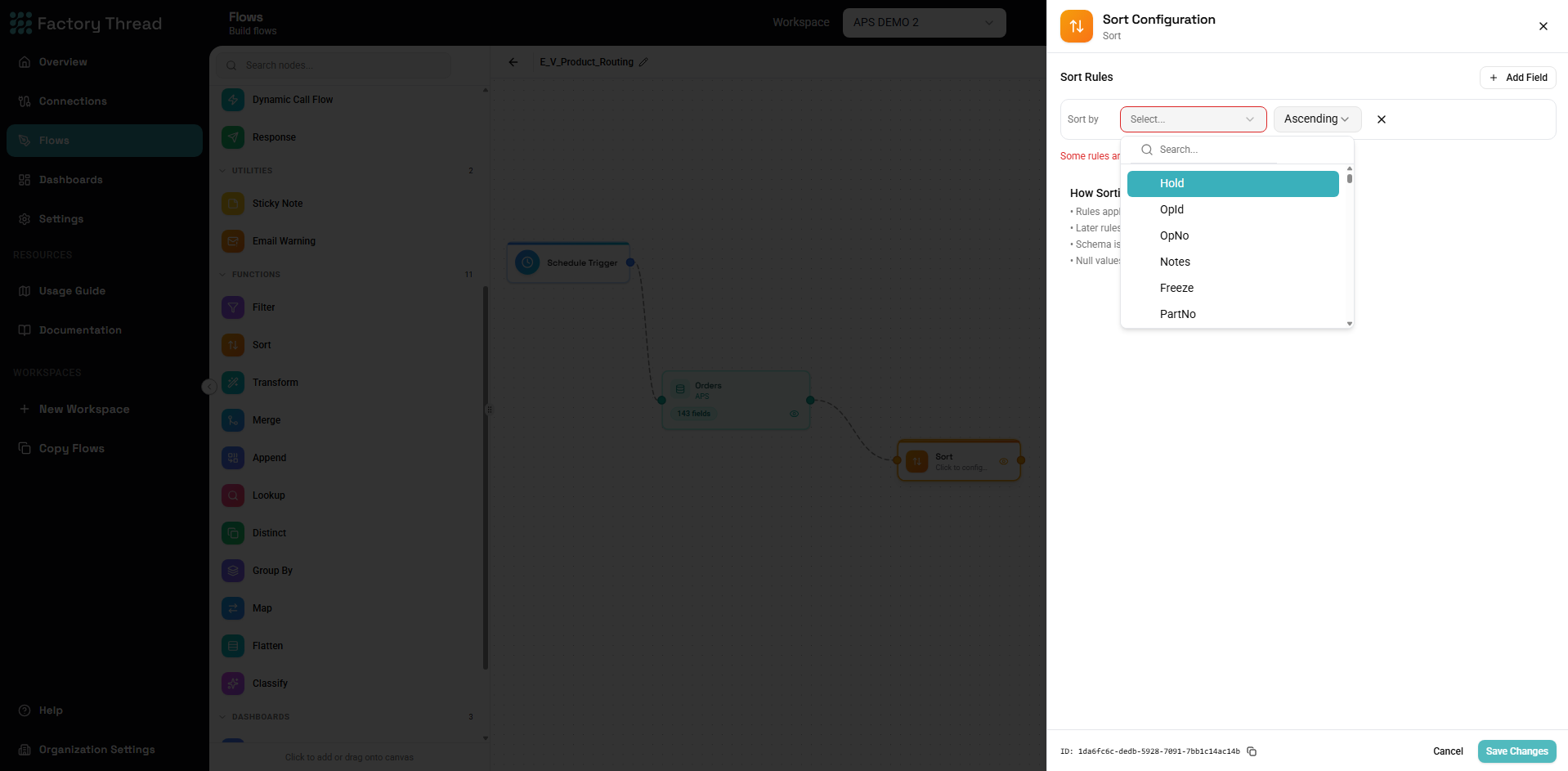
The Sort function orders your data rows based on one or more fields. It's essential for preparing data for presentation, ensuring correct processing order, or controlling which rows are kept by Distinct.
How It Works
Sort reorders all rows based on your specified criteria:
- Rows are rearranged but not added or removed
- All fields remain unchanged
- Multiple sort levels create hierarchical ordering
Adding a Sort
- Drag Sort from the Functions section of the Element Panel
- Connect it to your data source
- Click the Sort node to configure sort fields
Configuration Panel
Sort Fields
Define the ordering criteria:
Adding a Sort Field
- Click Add Sort Field
- Select a field from the dropdown
- Choose sort direction (Ascending or Descending)
Sort Direction
Ascending (A-Z, 0-9, oldest-newest):
- Text: A, B, C... Z
- Numbers: 1, 2, 3... 100
- Dates: Jan 1, Jan 2... Dec 31
Descending (Z-A, 9-0, newest-oldest):
- Text: Z, Y, X... A
- Numbers: 100, 99... 2, 1
- Dates: Dec 31... Jan 2, Jan 1
Multiple Sort Levels
Sort by multiple fields in priority order:
Example Configuration:
| Field | Direction |
|---|---|
| Region | Ascending |
| OrderDate | Descending |
| CustomerName | Ascending |
Result:
- First sorted by Region (A-Z)
- Within each Region, sorted by OrderDate (newest first)
- Within same Region and Date, sorted by CustomerName (A-Z)
Priority matters: First field is primary sort, second is secondary, etc.
Data Type Sorting
Text Sorting
Alphabetical order based on character codes:
- Case-sensitive: Uppercase before lowercase ("A" before "a")
- Special characters have defined positions
- Numbers in text sort as characters ("10" before "2")
For numeric-like text, transform first:
SortKey = TO_NUMBER(OrderNumber)
Number Sorting
Numeric order:
- Ascending: Smallest to largest
- Descending: Largest to smallest
- Decimals handled correctly
- Negatives sorted correctly
Date Sorting
Chronological order:
- Ascending: Oldest first (earliest date)
- Descending: Newest first (latest date)
- Time component included in comparison
Boolean Sorting
- Ascending: False (0), then True (1)
- Descending: True (1), then False (0)
NULL Handling
Null values in sort fields:
- Typically sort first in ascending order
- Sort last in descending order
- Behavior may vary by configuration
To control null position:
Formula before Sort:
SortField = COALESCE(Field, "ZZZZZ")  // Nulls sort last in ASC
SortField = COALESCE(Field, "")       // Nulls sort first in ASC
Common Use Cases
Chronological Reports
Scenario: Display orders by date
Sort Configuration:
| Field | Direction |
|---|---|
| OrderDate | Descending |
Result: Most recent orders first
Alphabetical Lists
Scenario: Customer directory
Sort Configuration:
| Field | Direction |
|---|---|
| LastName | Ascending |
| FirstName | Ascending |
Result: Customers sorted by last name, then first name
Top/Bottom Analysis
Scenario: Find highest values
Sort Configuration:
| Field | Direction |
|---|---|
| Amount | Descending |
Result: Highest amounts first (combine with limit for "Top 10")
Hierarchical Ordering
Scenario: Organize by category and name
Sort Configuration:
| Field | Direction |
|---|---|
| Category | Ascending |
| SubCategory | Ascending |
| ProductName | Ascending |
Result: Organized hierarchically
Priority Queues
Scenario: Process high priority first
Sort Configuration:
| Field | Direction |
|---|---|
| Priority | Ascending |
| CreatedDate | Ascending |
Result: High priority, oldest items first
Sort with Other Functions
Sort + Distinct
Control which duplicate row to keep:
[Data] → [Sort: ModifiedDate DESC] → [Distinct: ID, Keep First]
Result: Keeps most recently modified record per ID
Sort + Group By
Sort aggregated results:
[Data] → [GroupBy: Category, SUM(Amount)] → [Sort: TotalAmount DESC]
Result: Categories ordered by total amount
Sort + Filter
Order then filter (or vice versa):
[Data] → [Sort: Score DESC] → [Filter: Take top 100]
Result: Top 100 highest scores
Performance Considerations
Sort Early or Late?
Sort early when:
- Order affects processing (like Distinct with Keep First)
- Subsequent operations need ordered data
Sort late when:
- Only final presentation needs ordering
- Upstream filtering reduces row count
Memory Usage
Sorting requires holding data in memory:
- Large datasets use more memory
- Consider filtering first to reduce volume
Database Optimization
When source is a database:
- Consider sorting in the query (Entity configuration)
- Database indexes can speed up sorted retrieval
Troubleshooting
Sort Not Working
Possible causes:
-
Wrong data type (text vs number)
- "10" sorts before "2" as text
- Convert to number for numeric sort
-
Case sensitivity
- "apple" may sort after "Zebra"
- Use UPPER or LOWER to normalize
-
Whitespace
- Leading spaces affect sort position
- Use TRIM to clean data
Unexpected Order
Possible causes:
-
Multiple sort fields in wrong priority
- First field is primary
- Reorder as needed
-
NULL values positioning
- Add COALESCE to control null placement
-
Data quality issues
- Preview data to check actual values
Examples
Sales Leaderboard
Sort Configuration:
| Field | Direction |
|---|---|
| TotalSales | Descending |
Date-Based Report
Sort Configuration:
| Field | Direction |
|---|---|
| Year | Descending |
| Month | Descending |
| Day | Descending |
Multi-Level Organization
Sort Configuration:
| Field | Direction |
|---|---|
| Department | Ascending |
| Team | Ascending |
| EmployeeName | Ascending |
Priority + Age Queue
Sort Configuration:
| Field | Direction |
|---|---|
| PriorityLevel | Ascending |
| CreatedDate | Ascending |
Result: Highest priority, oldest items first
Next Steps
- Distinct Function - Remove duplicates after sorting
- Group By Function - Sort aggregated results
- Filter Function - Filter sorted data
- Building Flows - Complete workflow guide