Response Node
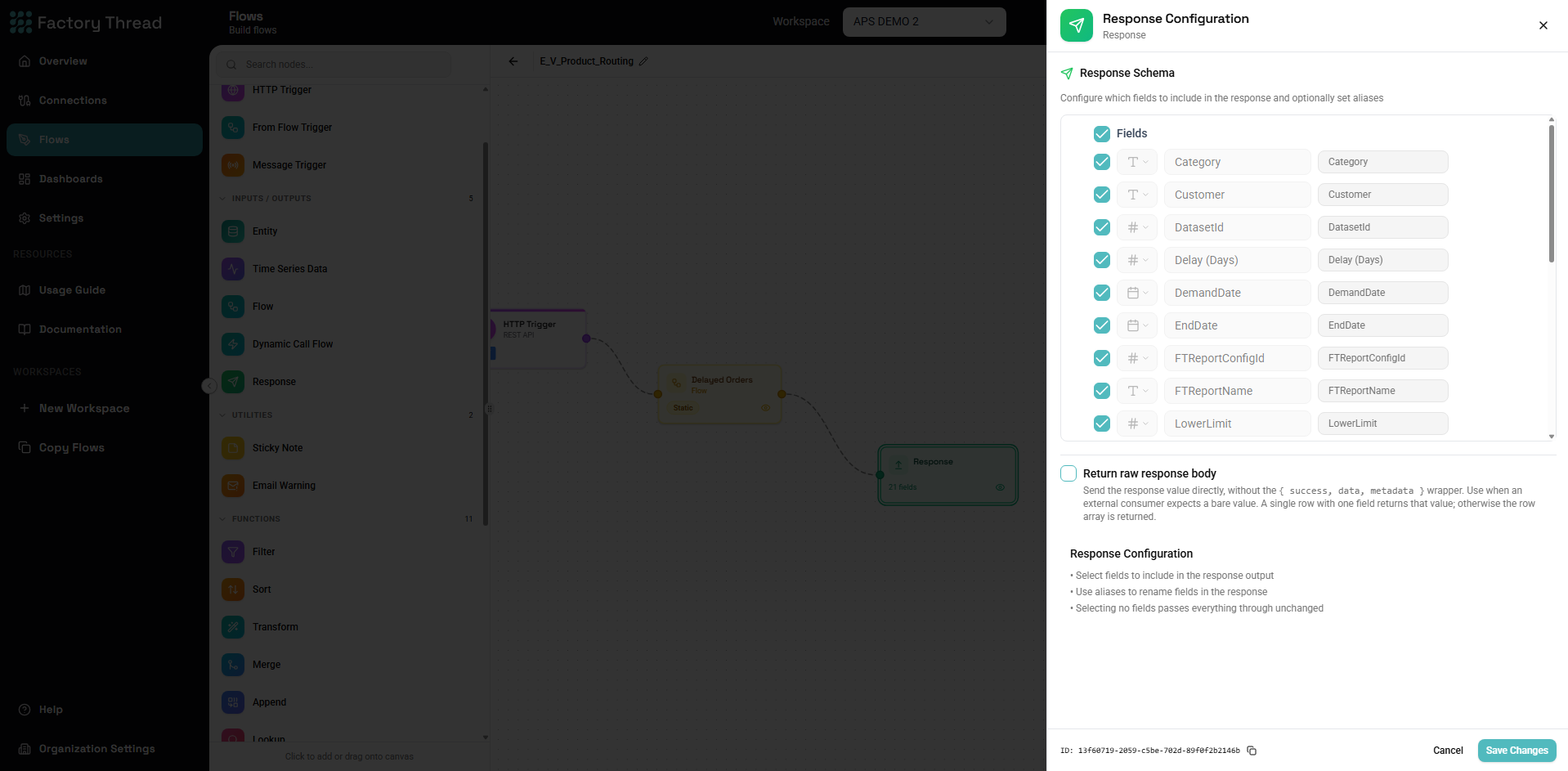
The Response node returns data from your workflow. It's required for HTTP-triggered flows (APIs) and FromFlow-triggered flows (sub-flows), defining what data is sent back to the caller.
How It Works
The Response node:
- Receives data from upstream processing
- Formats the output according to configuration
- Returns the data to the trigger source
- For HTTP triggers: Returns as API response
- For FromFlow triggers: Returns to calling flow
Adding a Response
- Drag Response from the Outputs section of the Element Panel
- Connect it to your final processing node
- Click the Response node to configure output format
Note: Response is typically the last node in a flow path.
Configuration Panel
Data Source
Input Data: The Response node receives whatever data reaches it:
- Filtered rows
- Transformed fields
- Aggregated results
- Single values or arrays
Field Selection
Choose which fields to include in the response:
All Fields: Every field from the input is included.
Selected Fields:
| Include | Field Name | Output Name |
|---|---|---|
| ✓ | CustomerID | id |
| ✓ | CustomerName | name |
| ✓ | ||
| InternalCode | (excluded) | |
| ✓ | TotalOrders | orderCount |
Benefits of selection:
- Cleaner API responses
- Hide internal fields
- Rename for external consumers
- Control payload size
Response Format (HTTP Triggers)
For HTTP-triggered flows, configure the response format:
JSON (Default)
Standard JSON response:
{
  "data": [
    { "id": "C001", "name": "Acme Corp", "email": "info@acme.com" },
    { "id": "C002", "name": "Beta Inc", "email": "contact@beta.com" }
  ],
  "count": 2,
  "success": true
}
Flat JSON Array
Simple array without wrapper:
[
  { "id": "C001", "name": "Acme Corp", "email": "info@acme.com" },
  { "id": "C002", "name": "Beta Inc", "email": "contact@beta.com" }
]
Single Object
When returning one record:
{ "id": "C001", "name": "Acme Corp", "email": "info@acme.com" }
Paginated Response
Include pagination metadata:
{
  "data": [...],
  "pagination": {
    "page": 1,
    "pageSize": 20,
    "totalCount": 156,
    "totalPages": 8
  }
}
HTTP Status Code
Set the HTTP status code for the response:
Success codes:
- 200 OK - Standard success (default)
- 201 Created - Resource created
- 204 No Content - Success with no body
Client error codes:
- 400 Bad Request - Invalid input
- 404 Not Found - Resource not found
Conditional status: Configure status based on data:
Status: IF({recordCount} > 0, 200, 404)
Response Headers
Add custom HTTP headers:
| Header | Value |
|---|---|
| Content-Type | application/json |
| X-Total-Count | {totalCount} |
| Cache-Control | no-cache |
Sub-Flow Responses
For FromFlow-triggered flows:
Response Data
Return data to the calling flow:
What gets returned:
- All fields reaching the Response node
- Or selected/renamed fields
Received by parent:
- CallFlow node receives the response
- Fields merged with parent flow data
Success/Error Indication
Include processing status:
Transform before Response:
success = true
errorMessage = null
Or on failure:
success = false
errorMessage = "Validation failed: missing required field"
Parent flow checks:
[CallFlow] → [Condition: success = true?]
                ├── True → [Continue]
                └── False → [Handle error]
Multiple Response Paths
A flow can have multiple Response nodes for different scenarios:
Conditional Responses
Flow structure:
[Process] → [Condition: Valid?]
               ├── True → [Success Response: 200]
               └── False → [Error Response: 400]
Each path has its own Response configuration.
Early Return
Return early based on conditions:
[Input] → [Condition: Cached?]
             ├── True → [Response: cached data]
             └── False → [Process] → [Response: fresh data]
Response Node Best Practices
Consistent Structure
Always return consistent schemas:
Good:
// Success
{ "success": true, "data": {...} }

// Error
{ "success": false, "error": { "code": "NOT_FOUND", "message": "..." } }
Avoid:
// Inconsistent - sometimes data at root, sometimes wrapped
{ "id": "123", "name": "..." }
// vs
{ "result": { "id": "123", "name": "..." } }
Include Metadata
Add helpful metadata:
{
  "data": [...],
  "metadata": {
    "count": 50,
    "timestamp": "2024-01-15T10:30:00Z",
    "version": "1.0"
  }
}
Error Information
Provide useful error details:
{
  "success": false,
  "error": {
    "code": "VALIDATION_ERROR",
    "message": "Invalid email format",
    "field": "email",
    "details": "Expected valid email address"
  }
}
Avoid Exposing Internals
Filter out internal fields:
Don't include:
- Internal IDs
- System timestamps
- Debug information
- Sensitive data
Transform before Response:
// Remove internal fields
[Map: select external fields only] → [Response]
Empty Results
Handle empty results gracefully:
Empty Array
When no data matches:
{
  "data": [],
  "count": 0,
  "success": true
}
404 for Single Resource
When a specific resource isn't found:
Use Condition:
[Lookup] → [Condition: Found?]
              ├── True → [Response 200]
              └── False → [Response 404]
Large Responses
For large datasets:
Pagination
Return paginated results:
{
  "data": [...],  // 20 items
  "page": 2,
  "pageSize": 20,
  "totalCount": 350,
  "hasMore": true
}
Streaming (if supported)
For very large responses:
- Consider file output instead
- Or batch processing
- Or streaming endpoints
Limiting
Set maximum response size:
In flow:
[Data] → [Limit: 1000 rows] → [Response]
With warning:
{
  "data": [...],
  "truncated": true,
  "message": "Results limited to 1000 records"
}
Performance Considerations
Field Selection
Select only needed fields:
- Reduces serialization time
- Smaller network payload
- Faster client processing
Response Size
Monitor response sizes:
- Large responses slow down clients
- Consider pagination
- Compress if possible
Caching Headers
Add caching headers when appropriate:
Cache-Control: max-age=300
ETag: "abc123"
Troubleshooting
Empty Response
Possible causes:
- No data reaching Response node
- All fields filtered out
- Upstream node returning empty
Solutions:
- Preview nodes to trace data flow
- Check filter conditions
- Verify field selection
Wrong Data
Possible causes:
- Wrong branch reaching Response
- Field mapping incorrect
- Transform errors
Solutions:
- Trace data path
- Preview at each step
- Verify field mappings
Missing Fields
Possible causes:
- Field not selected
- Field name mismatch
- Upstream transform removed field
Solutions:
- Check field selection
- Review upstream transforms
- Verify field names
HTTP Errors
400/500 errors:
- Check error Response configuration
- Verify status code logic
- Review error paths
Examples
API Endpoint Response
Flow: Get customers API
[HTTP Trigger] → [Entity: Customers] → [Filter] → [Map] → [Response]
Response configuration:
- Format: JSON with wrapper
- Status: 200
- Fields: id, name, email, status
Output:
{
  "success": true,
  "data": [
    { "id": "C001", "name": "Acme", "email": "info@acme.com", "status": "active" }
  ],
  "count": 1
}
Sub-Flow Response
Flow: Validate order (sub-flow)
[FromFlow: orderId, items] → [Validate] → [Response]
Response fields:
- isValid (boolean)
- errors (array)
- warnings (array)
Parent receives:
{ "isValid": true, "errors": [], "warnings": ["Shipping address not verified"] }
Error Response
Flow: Update resource API
[HTTP Trigger] → [Entity] → [Condition: Found?]
                               ├── True → [Update] → [Response 200]
                               └── False → [Response 404]
404 Response:
{
  "success": false,
  "error": {
    "code": "NOT_FOUND",
    "message": "Resource with ID xyz not found"
  }
}
Paginated List
Flow: List products API
[HTTP Trigger: page, pageSize] → [Entity with offset] → [Count total] → [Response]
Response:
{
  "data": [...],
  "pagination": {
    "page": 2,
    "pageSize": 25,
    "totalCount": 156,
    "totalPages": 7,
    "hasNext": true,
    "hasPrev": true
  }
}
Next Steps
- HTTP Trigger - Create API endpoints
- FromFlow Trigger - Create sub-flows
- CallFlow Node - Call sub-flows
- Building Flows - Complete workflow guide