HTTP Trigger
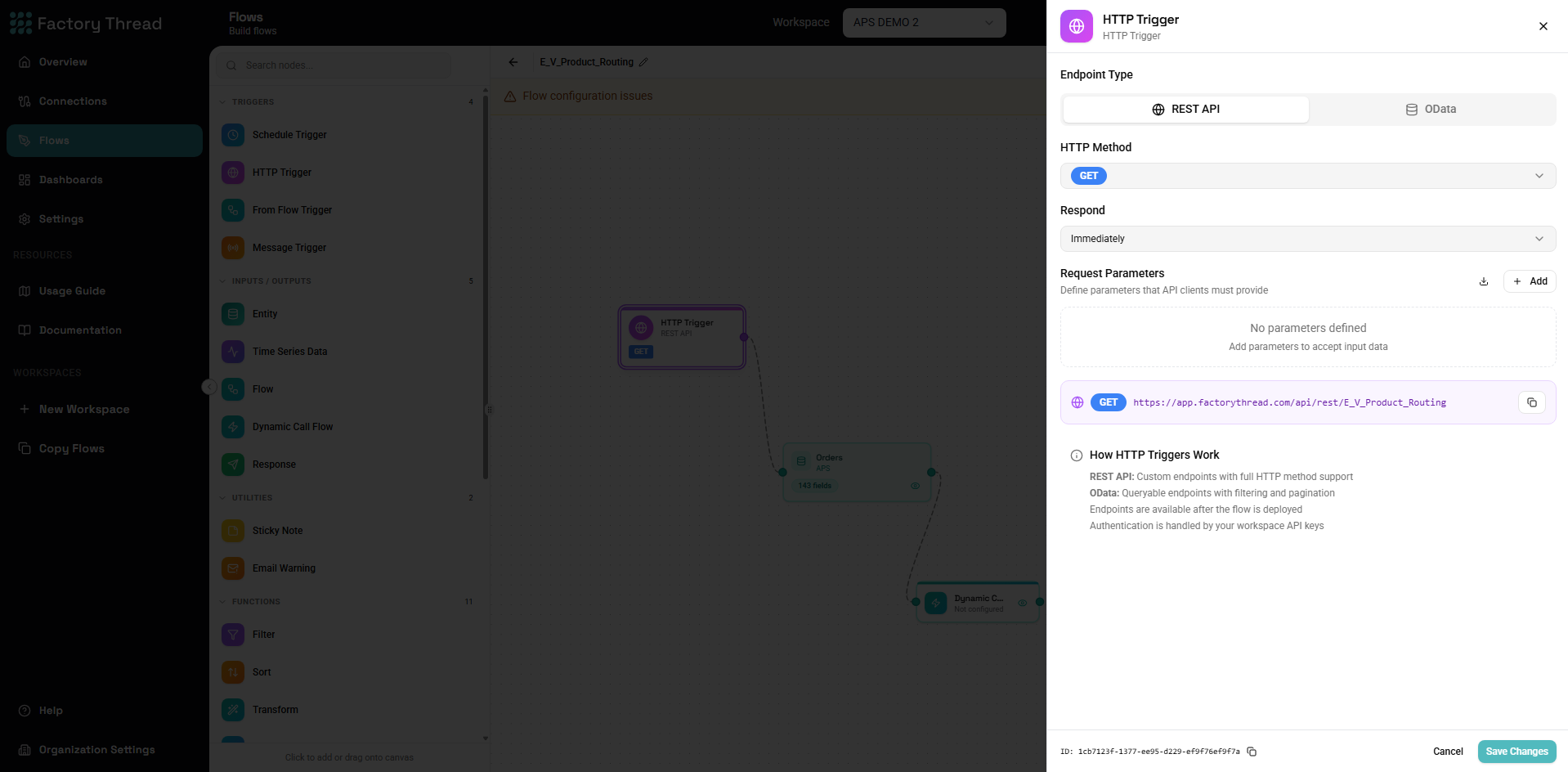
The HTTP Trigger exposes your flow as a REST API endpoint. External systems can call this endpoint to execute your flow, pass parameters, and receive results in real-time. Use it for building APIs, webhook receivers, and real-time integrations.
When to Use HTTP Triggers
Ideal for:
- Building REST APIs for external consumption
- Receiving webhooks from third-party services
- Real-time data requests
- Synchronous integrations with other systems
- Creating OData endpoints for reporting tools
Not ideal for:
- Recurring scheduled tasks (use Schedule Trigger)
- Long-running batch processes (consider async patterns)
- Internal-only reusable logic (use From Flow Trigger)
Adding an HTTP Trigger
- Open your flow in the Designer
- Click Action in the toolbar
- Select HTTP Trigger
- The trigger node appears on the canvas
- Click the node to configure the endpoint
Configuration Panel
Endpoint Settings
Endpoint Path The URL path for your API endpoint:
- Auto-generated: System creates a unique path
- Custom: Specify your own path (e.g.,
/customers,/orders/{id})
Full URL Format:
https://api.factorythread.com/v1/{workspace-id}/flows/{flow-id}/{path}
Or with custom API domain:
https://your-api.factorythread.com/{path}
Path Parameters Include dynamic segments in your path using curly braces:
/customers/{customerId}
/orders/{orderId}/items/{itemId}
/reports/{year}/{month}
Path parameters are automatically extracted and available as input parameters.
HTTP Methods Select which HTTP methods this endpoint accepts:
| Method | Typical Use | Has Body |
|---|---|---|
| GET | Retrieve data | No |
| POST | Create data, complex queries | Yes |
| PUT | Replace data | Yes |
| PATCH | Partial update | Yes |
| DELETE | Remove data | No |
You can enable multiple methods on a single endpoint if your flow handles them differently.
Authentication
API Key Required (Recommended) When enabled, requests must include a valid API key:
GET /api/endpoint HTTP/1.1
Authorization: Bearer your-api-key-here
Or as a query parameter:
GET /api/endpoint?api_key=your-api-key-here
Public Access When API key is not required:
- Anyone with the URL can call your endpoint
- Use only for truly public data
- Consider rate limiting implications
Security Best Practice: Always require API key authentication unless you have a specific reason for public access.
Request Schema
Define the expected input structure for your endpoint:
Query Parameters
For GET requests and optional filters on other methods:
Parameters:
  - name: customerId
    type: string
    required: true
    description: The customer identifier

  - name: includeDetails
    type: boolean
    required: false
    default: false
    description: Include extended details

  - name: limit
    type: number
    required: false
    default: 100
    description: Maximum results to return
Accessing in Flow:
Query parameters become available as ${paramName} in your flow nodes.
How a Call Fills the Parameters
| How the Action runs | Where its values come from |
|---|---|
GET /api/rest/{name} | The query string, matched to parameters by name (?schedule_start_date=2026-10-13). Use a dot for a nested parameter (?filter.site=Amman), and repeat a key for a list (?ids=1&ids=2). |
POST /api/rest/{name} | The JSON body. |
| Run in the editor, and the MCP run tool | The values entered or passed as input. |
On every one of these:
- Types: a query value is converted to its parameter's type. A number must be numeric, and a true/false parameter takes
true,false,1or0. A value that doesn't fit is refused with a 400 that names the parameter, so the Action never runs on a wrong value. - Defaults: a parameter the caller leaves out takes its default, as does an empty query value for anything but text. On a REST call, a required parameter with no default is refused with a 400.
- Credentials:
api_keyis the credential, never a parameter.
Request Body
For POST, PUT, and PATCH requests:
JSON Schema Definition:
{
  "type": "object",
  "properties": {
    "customerId": {
      "type": "string",
      "description": "Customer identifier"
    },
    "orderDate": {
      "type": "string",
      "format": "date"
    },
    "items": {
      "type": "array",
      "items": {
        "type": "object",
        "properties": {
          "productId": { "type": "string" },
          "quantity": { "type": "number" }
        }
      }
    }
  },
  "required": ["customerId", "items"]
}
Visual Schema Builder:
- Click Add Field
- Enter field name and select type
- Mark as required if needed
- Add nested objects or arrays as needed
Path Parameters
Automatically extracted from your endpoint path:
Path: /customers/{customerId}/orders/{orderId}
Generates parameters:
customerId(string)orderId(string)
Response Configuration
Response Format
JSON (default) Standard JSON response for most API use cases.
OData Enables OData query capabilities for reporting tools:
$select- Choose specific fields$filter- Filter results$orderby- Sort results$top/$skip- Pagination
CSV Returns data as comma-separated values.
XML Returns data as XML document.
Response Schema
Define the structure of successful responses using the Response node in your flow.
HTTP Status Codes
Your flow can return different status codes:
| Code | Meaning | When to Use |
|---|---|---|
| 200 | OK | Successful GET, PUT, PATCH |
| 201 | Created | Successful POST that creates |
| 204 | No Content | Successful DELETE |
| 400 | Bad Request | Invalid input data |
| 401 | Unauthorized | Missing/invalid API key |
| 403 | Forbidden | Valid key, insufficient permissions |
| 404 | Not Found | Resource doesn't exist |
| 500 | Server Error | Unhandled flow error |
Advanced Options
Timeout Maximum time (in seconds) for the request:
- Default: 30 seconds
- Maximum: 300 seconds (5 minutes)
- For longer operations, consider async patterns
Rate Limiting Limit requests per time period:
- Per API key
- Per IP address
- Custom rules
CORS Settings For browser-based clients:
- Allowed origins
- Allowed headers
- Allowed methods
Caching Cache responses for repeated requests:
- Cache duration
- Cache key (based on parameters)
- Cache invalidation
Using Request Data in Your Flow
Accessing Parameters
All request data is available in your flow nodes:
Path Parameters:
${customerId} # From /customers/{customerId}
Query Parameters:
${limit}         # From ?limit=100
${startDate}     # From ?startDate=2024-01-01
Body Fields:
${orderItems}    # From request body
${customer.name} # Nested fields
Headers:
${headers.X-Custom-Header}
Example: Filter by Request Parameter
- HTTP Trigger with query param
status - Entity node loads all orders
- Filter node:
Status equals ${status} - Response returns filtered orders
Example: Use Body Data
- HTTP Trigger with POST body containing order data
- Formula node processes the order
- Entity node (Update mode) writes to database
- Response confirms success
Building the Response
Response Node
Add a Response node to define your API output:
- Add Response node to your flow
- Connect it as the final step
- Configure which fields to return
- Set status codes for different scenarios
Response Structure
Simple Response:
{
  "id": "12345",
  "status": "success",
  "data": { ... }
}
List Response:
{
  "items": [...],
  "total": 150,
  "page": 1,
  "pageSize": 25
}
Error Response:
{
  "error": {
    "code": "INVALID_INPUT",
    "message": "Customer ID is required",
    "details": { ... }
  }
}
Conditional Responses
Use Condition nodes to return different responses:
If (order exists) → Return order details (200)
Else → Return not found error (404)
Testing HTTP Triggers
In the Designer
- Deploy your flow
- Click Test Endpoint in the trigger panel
- Enter test parameters
- View request and response
With cURL
# GET request
curl -X GET \
  "https://api.factorythread.com/v1/.../customers?status=active" \
  -H "Authorization: Bearer your-api-key"

# POST request
curl -X POST \
  "https://api.factorythread.com/v1/.../orders" \
  -H "Authorization: Bearer your-api-key" \
  -H "Content-Type: application/json" \
  -d '{"customerId": "123", "items": [...]}'
With Postman
- Create new request
- Enter your endpoint URL
- Add Authorization header with API key
- For POST/PUT, add JSON body
- Send and inspect response
With Browser (GET only)
For simple GET requests, you can test in your browser:
https://api.factorythread.com/v1/.../endpoint?api_key=your-key¶m=value
Note: Never expose API keys in browser URLs for production use.
OData Endpoints
Enable OData for Excel, Power BI, and other reporting tools:
OData Query Options
$select - Choose specific fields:
?$select=id,name,email
$filter - Filter results:
?$filter=status eq 'active'
?$filter=amount gt 1000 and region eq 'West'
?$filter=contains(name, 'Smith')
$orderby - Sort results:
?$orderby=created desc
?$orderby=lastName asc, firstName asc
$top & $skip - Pagination:
?$top=25&$skip=50 # Page 3 with 25 per page
$count - Include total count:
?$count=true
Connecting from Excel
- Data → Get Data → From OData Feed
- Enter your endpoint URL
- Select authentication method
- Choose tables/fields
- Load data
Connecting from Power BI
- Get Data → OData Feed
- Enter endpoint URL
- Configure authentication
- Select and transform data
- Load to model
Security Best Practices
API Key Management
- Generate unique keys per client/application
- Rotate keys periodically
- Revoke keys when no longer needed
- Use different keys for dev/staging/production
Input Validation
Always validate incoming data:
- Check required fields are present
- Validate data types
- Sanitize string inputs
- Validate ranges and formats
Rate Limiting
Protect against abuse:
- Set reasonable request limits
- Use per-key rate limits
- Implement exponential backoff
Error Handling
Never expose internal details:
Bad:
{
  "error": "SQL Error: SELECT * FROM customers WHERE id = '123' failed"
}
Good:
{
  "error": {
    "code": "DATA_ERROR",
    "message": "Unable to retrieve customer data"
  }
}
Performance Optimization
Response Time
- Filter data at the source (use Entity filters)
- Return only needed fields
- Use pagination for large datasets
- Consider caching for static data
Payload Size
- Compress responses (automatic with gzip)
- Paginate large results
- Allow clients to request partial data
Concurrency
- HTTP endpoints scale automatically
- Long-running operations may need queuing
- Consider async patterns for heavy processing
Troubleshooting
401 Unauthorized
- Check API key is valid
- Verify Authorization header format
- Ensure key has required permissions
400 Bad Request
- Review request body against schema
- Check required fields are provided
- Validate data types
500 Internal Server Error
- Check Insights for execution details
- Review flow logic for errors
- Verify connections are healthy
Slow Response
- Check execution duration in Insights
- Optimize slow nodes
- Consider caching
- Review data volumes
CORS Errors
- Verify CORS settings include your origin
- Check allowed methods
- Ensure headers are permitted
Examples
Customer Lookup API
Endpoint: GET /customers/{id}
Flow:
- HTTP Trigger extracts
id - Entity loads customer where ID =
${id} - Response returns customer data
Create Order API
Endpoint: POST /orders
Body:
{
  "customerId": "C123",
  "items": [
    {"productId": "P456", "quantity": 2}
  ]
}
Flow:
- HTTP Trigger parses body
- Transform calculates totals
- Entity writes to Orders table
- Response returns order confirmation
Search API with Pagination
Endpoint: GET /products
Parameters: search, page, pageSize
Flow:
- HTTP Trigger extracts parameters
- Entity loads products with filter
- Distinct removes duplicates
- Response with pagination metadata
Next Steps
- FromFlow Trigger - Build reusable flows
- Schedule Trigger - Time-based automation
- Response Node - Configure API responses
- API Keys - Manage authentication