API Keys
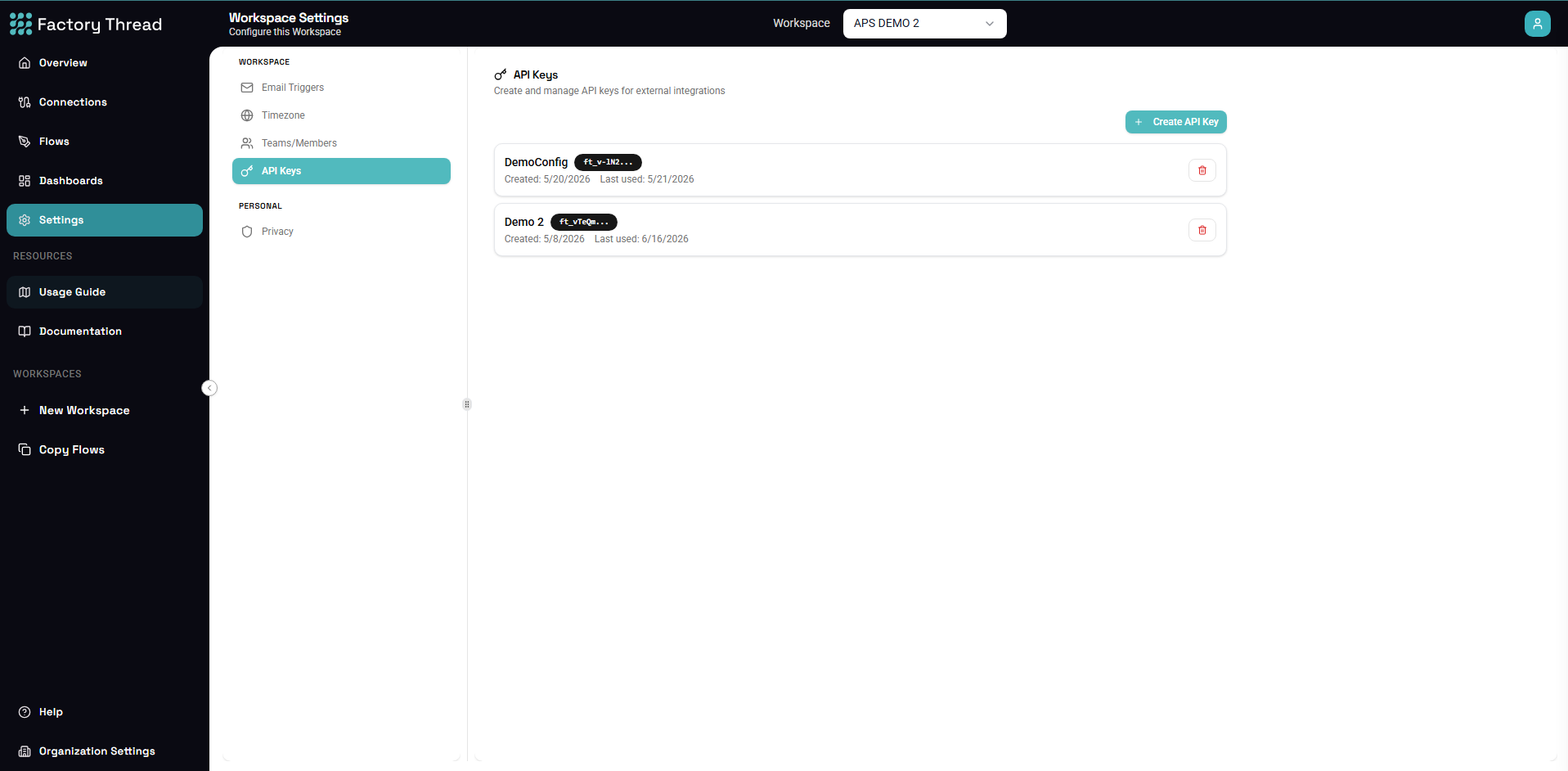
API keys enable external applications to interact with your FactoryThread workflows securely. Use them to trigger HTTP-triggered flows, access the management API, or integrate with third-party systems.
What Are API Keys?
API keys are secure tokens that:
- Authenticate requests to your workflows
- Control access to specific flows or features
- Track usage and enable auditing
- Can be revoked when no longer needed
Accessing API Key Settings
- Navigate to Settings in the sidebar
- Click API Keys
- View, create, or manage your keys
Creating an API Key
Step 1: Click Create Key
- Click Create API Key button
- The creation dialog opens
Step 2: Configure Key Settings
Key Name: Descriptive name for the key
Example: "Production Integration", "Partner Access", "Development Testing"
Description: Optional notes about key purpose
Example: "Used by the ERP system to trigger order sync flows"
Expiration: When the key should expire
- No expiration (not recommended for production)
- 30 days
- 90 days
- 1 year
- Custom date
Permissions: What the key can access
- All flows (full access)
- Specific flows (select flows)
- Read-only (view executions only)
Step 3: Generate Key
- Click Generate Key
- The key is displayed once
- Copy the key immediately
- Store it securely
Important: The full key is only shown once. If lost, you must generate a new key.
API Key Format
Keys have this structure:
ft_live_xxxxxxxxxxxxxxxxxxxxxxxxxxxxxxxxxxxxxxxx
Prefix indicates environment:
ft_live_- Production keysft_test_- Test/sandbox keys
Using API Keys
In HTTP Headers
Authorization header:
Authorization: Bearer ft_live_xxxx...
Example request:
curl -X POST https://api.factorythread.com/flows/abc123/execute \
  -H "Authorization: Bearer ft_live_xxxx..." \
  -H "Content-Type: application/json" \
  -d '{"customerId": "C001"}'
In Query Parameters
URL parameter (less secure):
https://api.factorythread.com/flows/abc123/execute?api_key=ft_live_xxxx...
Note: Headers are preferred for security.
In Custom Endpoints
For HTTP-triggered flows with custom URLs:
https://your-workspace.factorythread.io/api/orders?api_key=ft_live_xxxx...
Key Permissions
Full Access
- Execute any flow
- View all executions
- Access management API
- Manage connections (if admin)
Flow-Specific
- Execute only selected flows
- View executions of those flows
- Cannot access other resources
Setting specific flows:
- Choose "Specific Flows" permission
- Select flows from the list
- Only those flows are accessible
Read-Only
- View flow definitions
- View execution history
- Cannot trigger executions
- Cannot modify anything
Managing Existing Keys
View Keys
The API Keys list shows:
| Column | Description |
|---|---|
| Name | Key display name |
| Created | Creation date |
| Last Used | Last API call date |
| Expires | Expiration date |
| Status | Active/Expired/Revoked |
Key Actions
View details: Click a key to see:
- Full configuration
- Usage statistics
- Associated flows
Regenerate: Create a new key value:
- Invalidates the old key
- Same settings retained
- New key value generated
Revoke: Permanently disable the key:
- Immediate effect
- Cannot be undone
- Requests will fail
Delete: Remove the key entirely:
- Removes from list
- Historical usage preserved in logs
Best Practices
Security
Do:
- Use unique keys per integration
- Set appropriate expirations
- Use minimal required permissions
- Store keys in secure vaults
- Rotate keys periodically
Don't:
- Share keys between applications
- Commit keys to source control
- Use keys in client-side code
- Share production keys
Naming Conventions
Good names:
erp-order-sync-production
partner-acme-integration
mobile-app-v2-access
internal-reporting-tool
Poor names:
key1
test
my key
asdf
Rotation Schedule
Recommended rotation:
| Key Type | Rotation Frequency |
|---|---|
| Production | Every 90 days |
| Partner | Every 180 days |
| Development | Every 30 days |
| CI/CD | Every 90 days |
Monitoring
Track usage:
- Review "Last Used" regularly
- Investigate unused keys
- Monitor for unusual patterns
- Set up alerts for failures
Troubleshooting
Authentication Failed
Symptoms: 401 Unauthorized response
Possible causes:
- Key is incorrect
- Key has expired
- Key was revoked
- Wrong header format
Solutions:
- Verify key is copied correctly
- Check expiration status
- Confirm key is active
- Use correct header format
Permission Denied
Symptoms: 403 Forbidden response
Possible causes:
- Key lacks permission for flow
- Key is read-only
- Flow is not published
Solutions:
- Check key permissions
- Update permissions if needed
- Verify flow is deployed
Rate Limited
Symptoms: 429 Too Many Requests
Possible causes:
- Too many requests per minute
- Exceeding daily limit
Solutions:
- Implement request throttling
- Batch requests if possible
- Contact support for limit increase
Usage Tracking
Viewing Usage
Each key tracks:
- Total requests
- Requests by day/hour
- Success/failure rate
- Flows accessed
Usage Reports
Export usage data:
- Click on a key
- Click Export Usage
- Download CSV/JSON report
Alerts
Set up usage alerts:
- Unusual activity patterns
- Failed authentication attempts
- Usage approaching limits
Integration Examples
cURL
curl -X POST \
  https://api.factorythread.com/flows/{flowId}/execute \
  -H "Authorization: Bearer ft_live_xxxx..." \
  -H "Content-Type: application/json" \
  -d '{"param1": "value1"}'
Python
import requests

headers = {
    "Authorization": "Bearer ft_live_xxxx...",
    "Content-Type": "application/json"
}

response = requests.post(
    "https://api.factorythread.com/flows/{flowId}/execute",
    headers=headers,
    json={"param1": "value1"}
)
JavaScript
const response = await fetch(
  'https://api.factorythread.com/flows/{flowId}/execute',
  {
    method: 'POST',
    headers: {
      'Authorization': 'Bearer ft_live_xxxx...',
      'Content-Type': 'application/json'
    },
    body: JSON.stringify({ param1: 'value1' })
  }
);
Postman
- Set authorization type to "Bearer Token"
- Enter your API key as the token
- Make requests as normal
Security Incidents
If a Key is Compromised
Immediate actions:
- Revoke the key immediately
- Generate a new key
- Update all integrations
- Review usage logs for unauthorized access
- Report incident to security team
Investigating Unauthorized Use
- Check key usage logs
- Identify suspicious activity
- Revoke affected keys
- Audit affected flows
- Implement additional controls
Next Steps
- HTTP Trigger - Create API endpoints
- Building Flows - Complete workflow guide
- Settings Overview - Other settings options