MES / MOM Connections
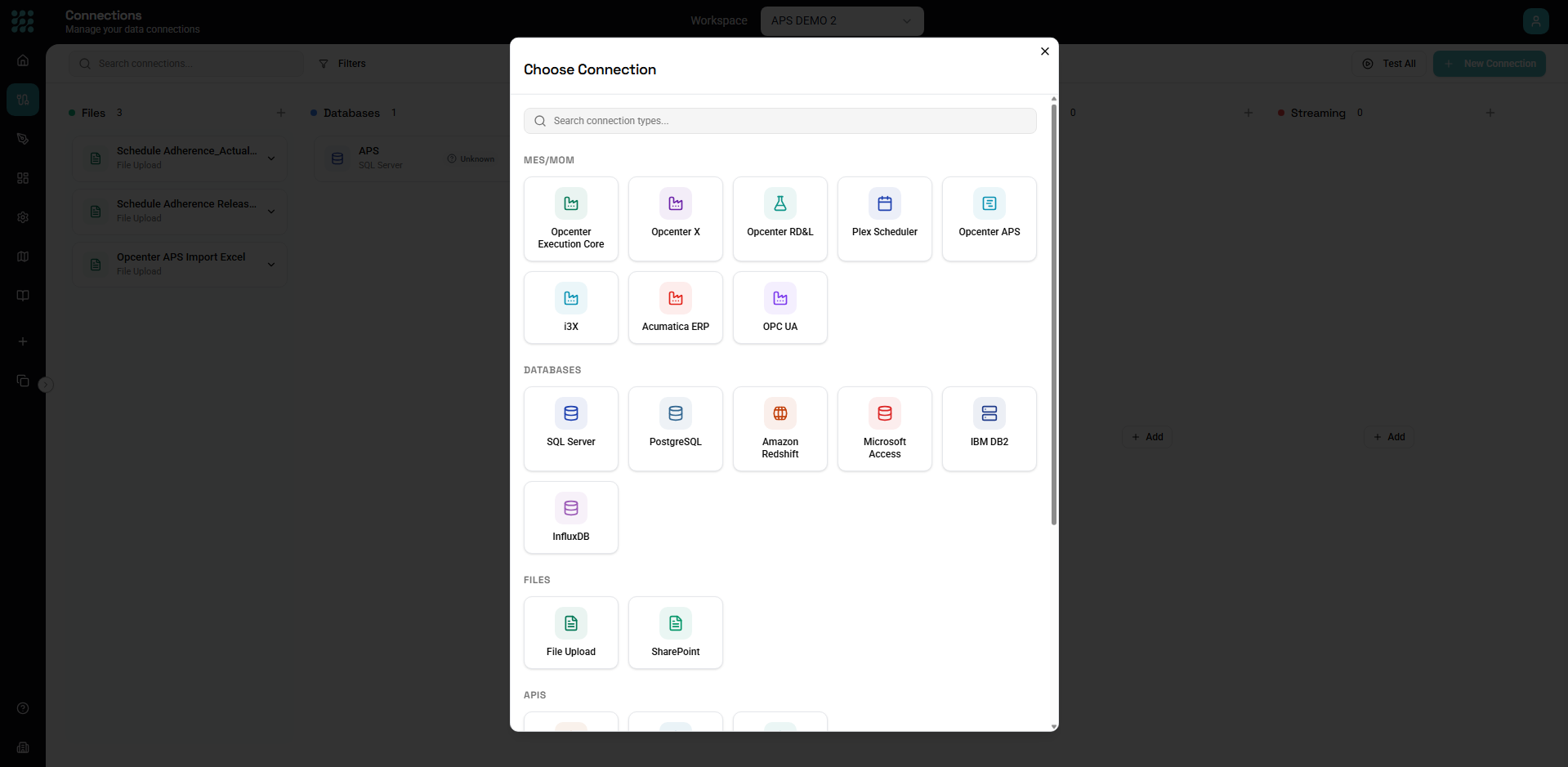
FactoryThread connects directly to manufacturing systems — execution (MES), operations management (MOM), ERP, planning and scheduling, and the shop floor itself. These connectors share a category in the New Connection dialog even though they reach their systems over different protocols (REST, OData, SQL Server, and OPC UA).
| Connector | System | Reaches it via | Write-back |
|---|---|---|---|
| Opcenter Execution Core | Siemens Opcenter Execution Core | REST API | Yes |
| Opcenter X | Siemens Opcenter X (cloud MOM) | REST API | Yes |
| Opcenter RD&L | Siemens Opcenter Research, Development & Laboratory | OData v4 | Yes |
| Opcenter APS | Siemens Opcenter Advanced Planning & Scheduling | SQL Server / Azure SQL | Yes |
| Plex Scheduler | Plex manufacturing scheduling | REST API | Yes |
| i3X | i3X / CESMII industrial interoperability | REST / JSON | Read only |
| Acumatica ERP | Acumatica Cloud ERP | Contract-Based REST API | Yes |
| OPC UA | OPC UA servers (PLCs, SCADA, MES) | OPC UA (opc.tcp) | Read only |
Siemens Opcenter Execution Core
Connects to Opcenter Execution Core over its REST API.
- API URL — the base endpoint.
- Authentication — Bearer Token, Client Credentials (Access Token URL, Client ID, Client Secret, Scope), Basic (Username, Password), Token With Credentials, or No Auth.
- Request headers, a connection timeout, and an Allow self-signed certificates toggle.
Entities (the resources you read and write) are defined by you per entity — REST connections don't auto-discover a schema.
Opcenter X
Siemens' cloud MOM. In FactoryThread it is configured as a REST API connection — the same form and authentication options as Opcenter Execution Core (API URL + authentication + headers). Reads and writes go through the REST endpoints; entities are user-defined.
Opcenter RD&L
Connects to Opcenter Research, Development & Laboratory over OData v4.
- API URL — the OData service root.
- Authentication — the standard options plus Session Auth (Login URL, Username, Password, and optional Company and Branch).
- Automatic schema discovery. Because RD&L is OData, FactoryThread reads
the service's
$metadataand discovers its entities and their schemas for you. Test Connection verifies the metadata is reachable, and the Entities list is populated automatically. Supports read and write-back.
Opcenter APS
Opcenter Advanced Planning & Scheduling stores its data in SQL Server / Azure SQL, so this connector uses a database connection.
- Choose SQL Connection (Server, Database, Port
1433, Username, Password) or paste a Connection String, plus a timeout. - Test Connection, entity browse, and schema discovery work as for any SQL
Server connection; planning tables live under the
UserDataschema. Supports full read and write-back.
See Database Connections for more on SQL Server settings.
Plex Scheduler
Connects to Plex manufacturing scheduling over its REST API using token-with-credentials auth.
- Access Token URL, Username, and Password (FactoryThread obtains and refreshes the token for you), plus the usual headers and timeout.
- Supports read and write-back. Entities are user-defined.
i3X
Connects to an i3X platform — the CESMII Industrial Information Interoperability eXchange — over REST/JSON.
- API URL and authentication (No Auth, Bearer, Client Credentials, Basic, or Session Auth), headers, and timeout.
- Browse the model. FactoryThread walks i3X's namespaces, object types, and objects to list entities, and infers each entity's schema from a sample of live values.
- Reads both current values and history. Read only — write-back to i3X is not yet supported.
Acumatica ERP
Connects to Acumatica Cloud ERP via its Contract-Based REST API.
- Session Auth by default: Login URL, Username, Password, and optional Company and Branch. OAuth client-credentials is also supported.
- Browse from the contract. FactoryThread reads Acumatica's
swagger.jsonto discover entities and their schemas; Test Connection reports the number of entities found. - Supports read (including Generic Inquiries and
$filter/$top/$expandoptions) and write-back, including bound actions such as releasing a document.
OPC UA
Connects to OPC UA servers — PLCs, SCADA, and MES systems — over the OPC UA
binary protocol (opc.tcp://).
- Endpoint URL — for example
opc.tcp://localhost:4840. - Security Mode — None, Sign, or Sign & Encrypt.
- Security Policy — None, Basic128Rsa15, Basic256, Basic256Sha256, Aes128_Sha256_RsaOaep, or Aes256_Sha256_RsaPss. (Policy must be None only when Security Mode is None.)
- Identity — Anonymous, Username & Password, or an X.509 certificate (Certificate PEM + Private Key PEM).
- A connection timeout.
Browse the address space. FactoryThread walks the server's nodes to list entities and reads each variable's data type. It reads both value snapshots and history, and can subscribe to live changes to drive a Flow (see Triggers). OPC UA is read only — FactoryThread does not write values back to the server.
Next steps
- Connections Overview — creating, testing, and managing connections
- Database Connections — SQL Server and Azure SQL details (Opcenter APS)
- Streaming Connections — MQTT brokers for real-time messages
- Triggers — run a Flow when shop-floor data arrives