Using Help
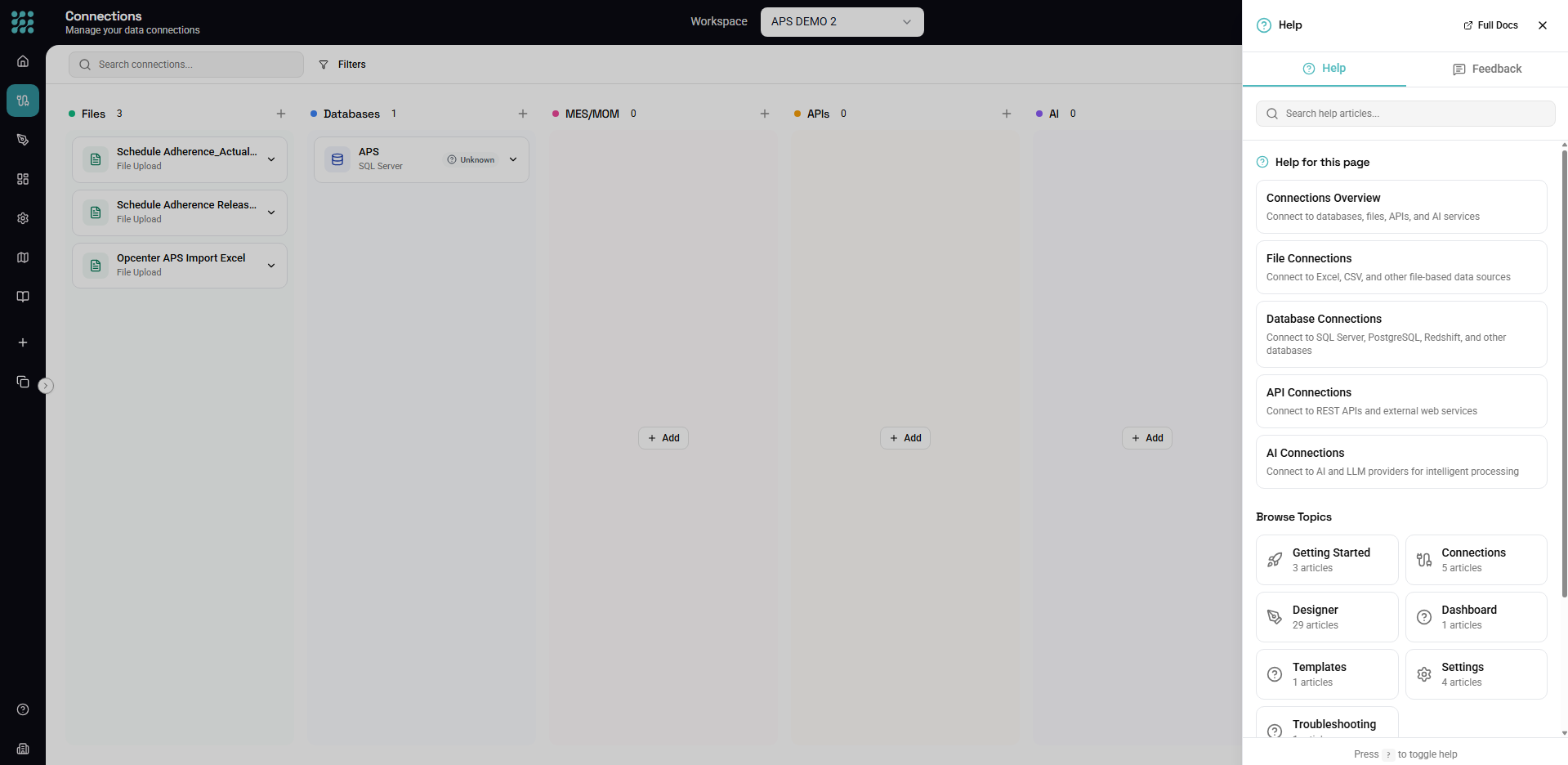
FactoryThread has a built-in Help panel you can open from anywhere in the app. It puts the documentation, search, and guides one keystroke away — without leaving the page you're working on.
Opening the Help panel
There are three ways to open it:
- Press
?(anywhere except a text field). - Press F1.
- Click the help icon (a question mark) in the top bar.
Press the same shortcut again, or Esc, to close it.
Tip: The
?shortcut is ignored while you're typing in an input, text area, or editor, so it never gets in the way of entering data.
The panel has two tabs at the top:
- Help — search and read documentation (covered below).
- Feedback — send us a bug report, idea, or question (see Sending feedback).
Finding help for the page you're on
When you open the panel, it suggests articles relevant to where you are in the app. Open Help from the Designer and you'll see Designer articles; open it on the Connections page and you'll see connection articles. This makes it the fastest way to get help for the task in front of you.
Searching
Use the search box at the top of the panel to look across all help articles by keyword — for example "schedule", "filter", or "API key". Results update as you type; click any result to read it inside the panel.
Reading an article
Articles open inside the panel, so you keep your place in the app. From an article you can:
- Follow links to related articles.
- Jump to an interactive guide when one is available (see Interactive Guides).
- Return to the Help home to browse or search again.
Sending feedback
Switch to the Feedback tab in the Help panel to tell us about a problem or an idea — without leaving the app or opening a support ticket.
Choose a type
Pick the kind of feedback you're sending:
| Type | Use it for |
|---|---|
| Bug Report | Something isn't working correctly. Include the steps to reproduce it if you can. |
| Feature Request | An improvement or new capability you'd like to see. |
| Question | You need help with something. |
| Other | General feedback that doesn't fit the above. |
Write your message
Describe your feedback in the message box. A little detail goes a long way — for a bug, what you did, what you expected, and what happened instead. A short minimum length is enforced so we always get something actionable.
What's sent with it
To help us follow up, each submission automatically includes:
- Your email, so we can reach you.
- The current page URL, so we know where you were.
- Basic browser information.
Click Send Feedback. You'll see a confirmation when it's received, and the form clears so you can send another. Your feedback is routed to our product and support teams.
When to use Help vs. the docs site
- Help panel — quick, in-context answers while you work; best for "how do I do this here?"
- Documentation site (where you're reading this) — the same articles in a full-page, browsable layout; best for reading end to end or sharing a link.
Next steps
- Interactive Guides — step-by-step walkthroughs of key features
- Quick Start — build your first workflow
- Introduction — what FactoryThread is and how it fits together